Editing tool for .INI files
Desktop.ini Editor is a free utility that was developed by Sordum for PC devices. It's a Windows utility that helps users open and edit the hidden desktop.ini file on their computers. The file contains information about various folder settings which they are able to configure as needed.
Just like Teracopy or MagicDisk, Desktop.ini Editor is one of the many tools that help users maximize or improve the functionality of various native Windows functions. It's also portable to it can be copied to a USB drive and be used on any computer as needed.
How does it work?
The desktop.ini file is a hidden file in Windows that stores information about various folder settings like its icon, the layout and arrangement of its contents, and others. Every time you create a new folder on your PC, a corresponding .ini file will automatically be generated for it. Desktop .ini Editor lets you easily open and edit these files and configure their settings to anything that you would like.
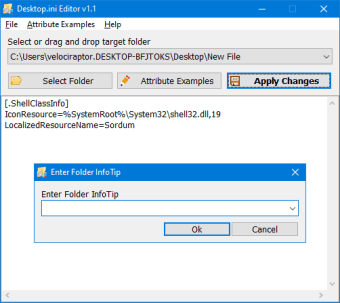
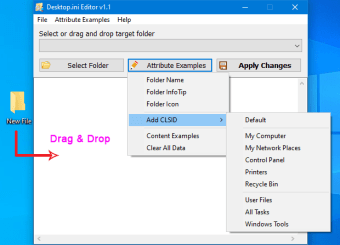
It features a simple and compact user interface that lets you start right away. To add a folder, you can click on the Select Folder button or simply drag-and-drop one onto it. There are several things that you can change by hitting the Attribute Examples. These include Folder Name, InfoTip, and Icon. You can also add a CLSID or simple Clear All Data to revert to its default configuration.
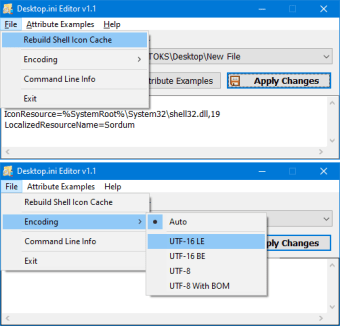
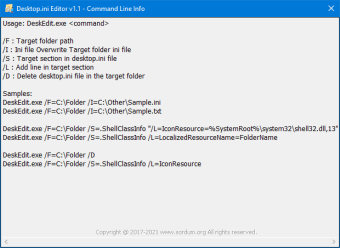
When you're done, click on the Apply Changes button and select the Rebuild Shell Icon Cache to force refresh the folder with your updated settings. The tool also supports operation via a Command Line interface if you prefer that route. While it's easy enough to use, you might encounter a slight learning curve, especially if you want to take advantage of the CLSID feature.
An easy way to manage folder settings
All in all, if you want to have more control over one or more of the folders in your PC, Desktop .ini editor might be able to help you out. It's portable, easy to use, and it just works reliably. The CLSID function is also great, but you might need to learn about it a bit more. Apart from that, this tool is recommended.